
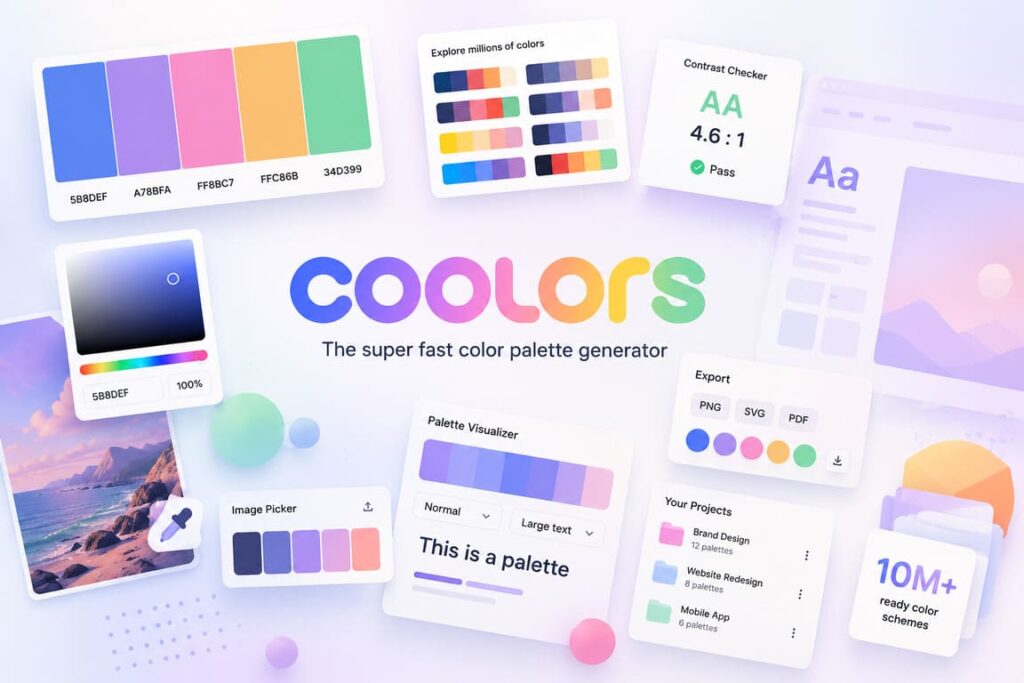

Coolors is a color palette platform built for speed. At its core, it is a palette generator, but in practice it has grown into a wider toolkit for designers, illustrators, marketers, UI teams, and content creators who need to choose colors quickly and turn them into usable assets. The company describes Coolors as a “lightning-fast, ultra-intuitive color palette generator,” and that description is fair: the product is clearly designed to remove friction from one of the most repetitive parts of visual work—finding color combinations that look right and also work in real projects.
One of the strongest things about Coolors is that it does not make color exploration feel technical or slow. You can generate palettes instantly, browse millions of combinations, extract colors from images, test contrast, and preview palettes on real designs. That means the site is useful both at the idea stage and at the production stage. Instead of forcing users to jump between separate tools, Coolors tries to keep inspiration, testing, organization, and export in one place.
Coolors was created by Fabrizio Bianchi, who identifies himself on his personal site as the creator of Coolors. The platform also presents itself in a personal way: on the site, Fabrizio refers to himself as “the guy behind this website,” which gives the product a more independent, maker-driven feel than many polished design SaaS platforms. On the Apple App Store listing, the app is described as being “made with love by Fabrizio Bianchi,” while the seller is listed as Coolors srl.
Coolors at a glance
| Category | Details |
|---|---|
| Product type | Color palette generator and design support platform |
| Creator | Fabrizio Bianchi |
| Company name on App Store | Coolors srl |
| Core promise | Fast palette generation, inspiration, accessibility checks, and export |
| Library size | 10M+ ready color schemes |
| Audience reach | 2M+ creatives inspired every day |
| Platforms | Web, iPhone, iPad, Mac, Apple Vision; also Figma plugin, Adobe extension, Chrome extension |
| Paid plan examples | Coolors Pro Monthly $4.99; Yearly $35.99 on the App Store |
Table based on official product and app listing information.
What makes Coolors stand out is its workflow logic. A lot of color tools can generate palettes, but Coolors is strong because it helps users move from random exploration to practical decision-making. You can start with fast generation, then save palettes, organize them into projects and collections, pull colors from images, and test how those colors behave in actual layouts. This is especially useful for people working on brand kits, landing pages, pitch decks, moodboards, packaging, or social media designs, where colors are not just decorative—they affect readability, hierarchy, and tone.
Another reason Coolors feels useful is that it respects real creative habits. Designers often begin with one good color, a reference photo, or a vague mood rather than a full system. Coolors supports that kind of messy beginning. Its Image Picker, Palette Visualizer, Color Picker, Tailwind palette preview, gradient tools, collage maker, and font-related resources show that the company is not trying to be only a “palette randomizer.” It is building a broader color workspace around common design decisions.
Why Coolors works well
- It is fast enough to be used during ideation. The generator removes hesitation and helps users explore more options in less time.
- It balances inspiration with utility. You do not just find colors; you can also preview and export them.
- It supports accessibility checks. That matters for UI, product, and web teams that need contrast-aware design.
- It has a real ecosystem. The availability of web tools, apps, and plugins makes it easier to use inside existing workflows.
- It stays approachable. Even non-designers can get value from it quickly because the interface is simple and visual.
Coolors also has a healthy free-to-paid model. The company says the service remains largely free, with the free plan mainly limiting saved palettes, projects, collections, and favorite colors. Pro unlocks the bigger toolkit: AI-powered color ideas, ad-free use, up to 10 colors in a palette, unlimited saves, unlimited projects, color extraction from images, collages, a pro profile page, accessibility tools, export options, privacy controls, and more. This is a smart positioning choice because it lets casual users test the product naturally, while frequent users can justify upgrading once organization and export become important.
A particularly interesting signal is the platform’s scale. Coolors says it offers access to 10 million-plus ready color schemes, and the App Store page says the app and website inspire more than 2 million creatives every day. The iOS app also carries a 4.8 out of 5 rating from 10K ratings, which suggests the product has reached more than a niche design audience. Those numbers do not automatically prove quality, but they do show strong product-market fit in a crowded category.
Strengths and weaknesses of Coolors
Main strengths
- Very fast palette generation
- Easy for beginners, still useful for professionals
- Strong visual preview tools
- Helpful accessibility features
- Good export and organization features
- Available beyond the browser through apps and plugins
Main weaknesses
- Some of the most practical workflow features are locked behind Pro
- Power users who need deep brand system management may still need separate design tools
- It is excellent for color decisions, but it is not a full design suite
Interesting facts about Coolors
- It was created by designer and developer Fabrizio Bianchi, which helps explain its strong maker-style simplicity.
- The platform now includes AI-driven color suggestions through Coolors AI / Color Bot.
- It extends beyond palettes into gradients, fonts, SVG recoloring, collages, and Tailwind-related previews.
- It supports professional presentation use through advanced export options and even custom logos on exported PDFs for Pro users.
- It is available not only on the web but also on Apple devices, including Mac and Apple Vision support on the App Store listing.
Final verdict on Coolors
Coolors is one of those tools that earns its popularity because it solves a narrow problem extremely well, then expands carefully around that problem. It does not try to impress users with complexity. Instead, it saves time, reduces guesswork, and makes color selection feel lighter and more intuitive. For freelancers, content creators, UI designers, brand designers, and even founders making quick presentations, Coolors is a genuinely useful product. The free version is enough to understand its value, and the Pro version makes sense for people who work with color regularly and want a more organized, export-friendly workflow.
FAQ about Coolors
Is Coolors free to use?
Yes. Coolors says it remains mostly free, with limits on saved palettes, projects, collections, and favorites for non-Pro users.
Who is Coolors best for?
It is best for designers, creators, UI teams, marketers, and anyone who needs fast color palettes with practical preview and export options.
What do you get with Coolors Pro?
Pro adds features such as AI color tools, unlimited saves, more palette flexibility, image color picking, collages, contrast tools, private profiles, advanced exports, and more layouts in the Palette Visualizer.
Is the app well rated?
According to the App Store listing, the app has a 4.8/5 rating from 10K ratings.